Family Photo Prints
I took a bunch of really great photos on a family holiday at my parents' place in Dorset. My niece and nephew are 5 and 7; the world to them is magic. They will never be that age again.
Film photography comes to life when you have physical prints of the photos. I didn't want my photos to just live in my sister's and parents' Photos app or in a WhatsApp chat — I wanted to make it as easy as possible for them to have these photos.
The first part of this was trivial from an engineering point of view, but I want to write about it because I think it shows a bigger shift: how in just an hour or two you can now put together software that can genuinely make a difference to the lives of those around you, however small — in this case, simply having some great physical photos.
The first thing to tackle was distribution: a site where four couples can browse the scans and mark what they want, at what size, without a group chat where everyone quotes filenames at each other. The second was harder and more interesting: I have shot about 10 rolls of film now, and I had no idea which photographs were any good, or even where they all were. The third was a repair job on a single low-resolution frame, which turned into a small tool.
This is a write-up of all three. The interesting engineering is in the second one.
Part one: the print picker
The ask was small and specific. Four pairs — James & Jasmine, Tom & Clara, Mum & Dad, Tilly & Harry — each browse the same set of photographs, tap a size on the ones they want, and submit. I check a private page to see what everyone picked, then place one order.
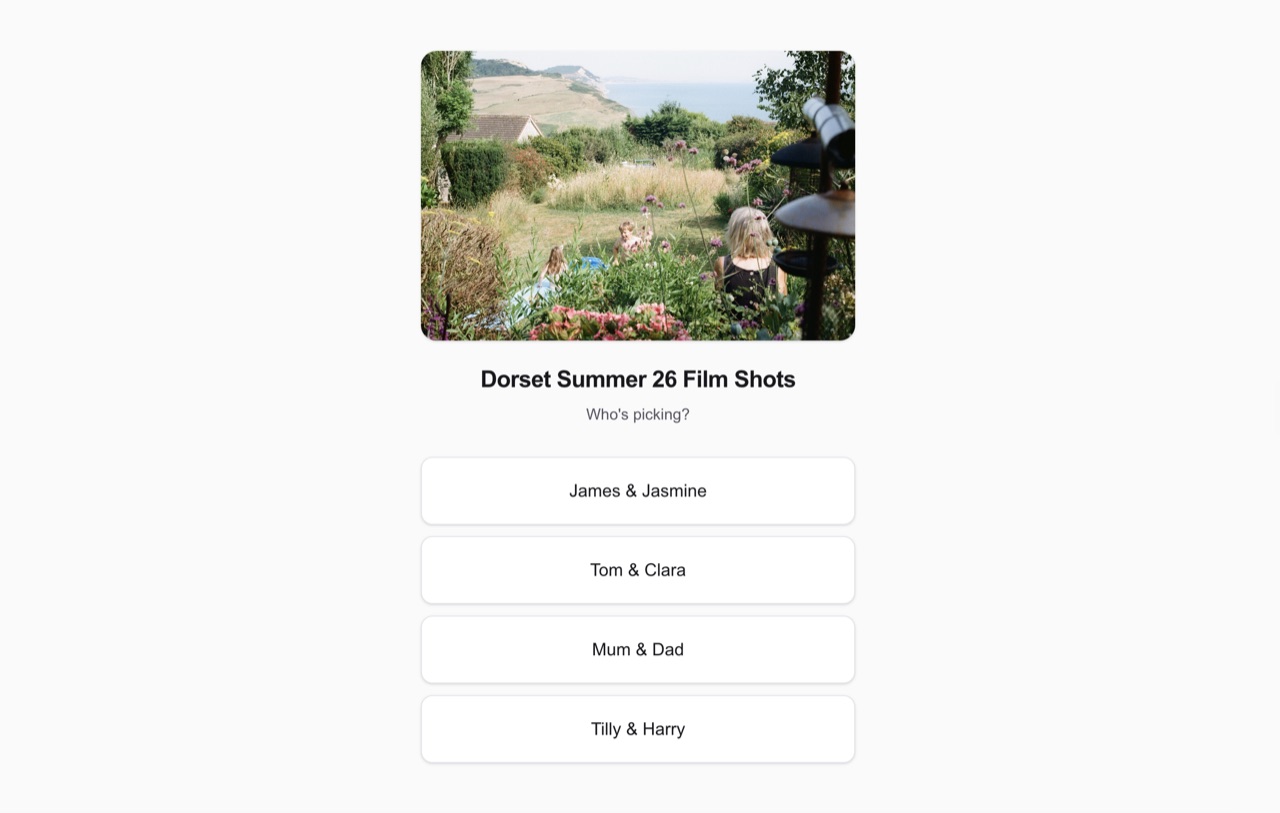 The front screen: one unlisted link, four pairs, no login
Four print sizes: Gallery, Large, A4, A3. Later I added mounts, which are the standard framing sizes a lab will mat a print onto — a Gallery print on an 11×14in board, for instance. The mount options are size-specific because the real ones are: Gallery gets three, Large and A4 get one each, and A3 gets none, because the next board up is A2 and posting A2 is a nuisance. The picker enforces this — choose a size and you are only ever offered the mounts that actually exist for it, and nothing over A3 is offered at all. Again not technically complicated, but it requires some level of subject-matter expertise to add this, in my opinion, value-add feature.
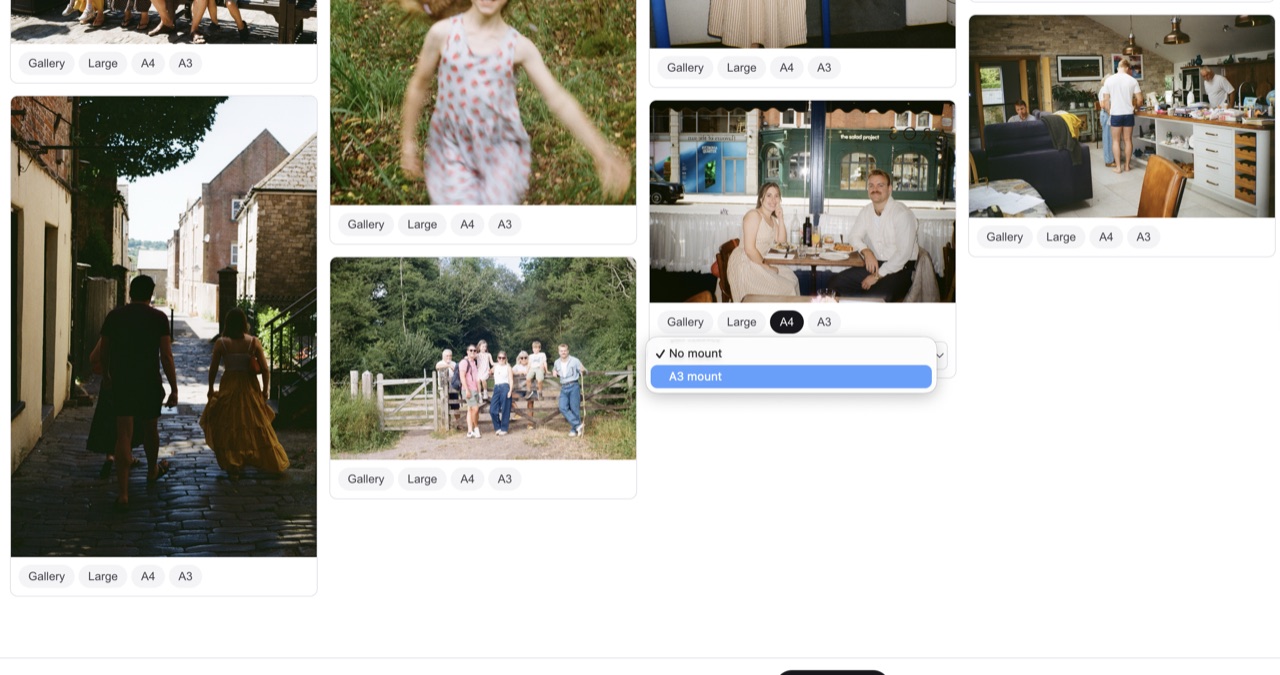 Pick a size, and only the mounts that exist for it appear — an A4 print offering its A3 mount, nothing bigger
The whole thing is a Next.js app on Vercel. The photographs are pre-resized to 1600px on the long edge by a local script and committed to the repo, which means no image processing happens at request time and no CDN bill accrues for resizing the same 111 files forever.
There is no database
The first version used Postgres via Supabase, and two days later the site was returning 500s on every page. I had hit the free tier's two-active-project limit across other work and this project's database was the one that got paused.
I misdiagnosed it. The project's subdomain had stopped resolving entirely, and I read NXDOMAIN as "the project has been deleted", told myself the submitted picks were unrecoverable, and said so. That was wrong: Supabase drops the DNS record for paused projects too, so a paused project and a deleted one look identical from the outside. The right move was to open the dashboard and look, which took about fifteen seconds once I did it.
Either way the fix was to stop needing Postgres. There are four pairs and 111 photographs. The entire state of this application is four small JSON objects, and I was paying for a relational database, a connection pooler and a project quota to hold them. This was simply a case of over-engineering, and AI will often lead you down this path.
It now runs on Vercel Blob: one file per pair at selections/<pair>.json, holding which photos they picked, what size, what mount, and when they last submitted. No schema, no migrations, no separate account, no quota to run out of, and the store is provisioned from the command line rather than a dashboard.
The trade is real and worth naming. Blob is eventually consistent — a read within a second or two of a write can return the previous version. For an app where four people submit a handful of times each, that is invisible. If two people were editing the same record concurrently it would be the wrong choice.
The bug I shipped
The admin page has a photo manager for hiding shots I would rather not put in front of everyone. First version: click Hide, the button posts, the server reads the current hidden list, adds one ID, writes it back.
That is a read-modify-write, and it races. Clicking five photos quickly fires five overlapping requests, each reading the list before any of the others has written, and the last one to land wins. Four selections vanish silently. It looked exactly like "saving is broken", which is what I was told, twice, before I found it.
The fix is to move to the client. The browser holds the complete hidden list, and a debounced save sends the whole set 400ms after the last click. One write, containing everything, with nothing on the server to race against. Five rapid clicks now persist five hidden photos.
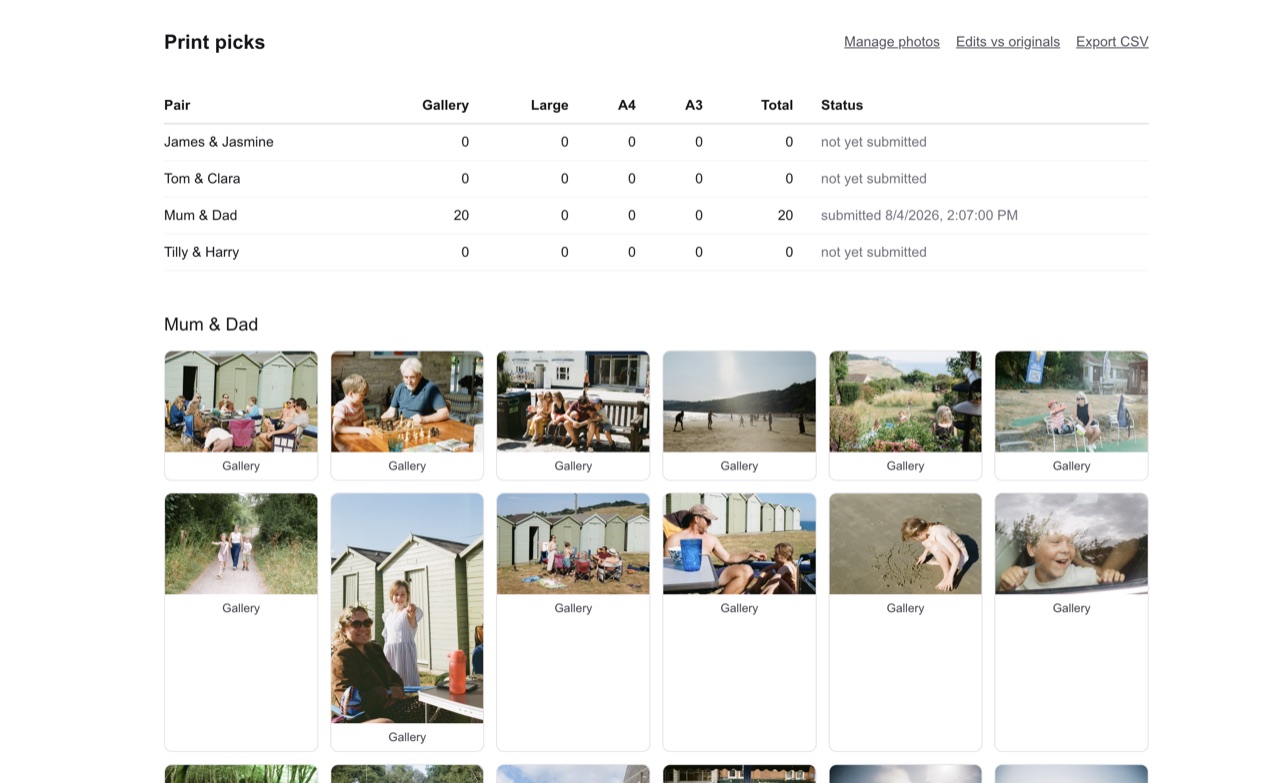 The private page: totals and submission status per pair, then every pick with its size
Part two: an AI-scored database of all my film shots
This is the interesting part, and the idea only came to me after putting up the small site for my family.
I wanted every film photograph I had ever taken in one folder, and I also wanted those photos ranked. I understand AI is hardly an arbiter of taste, but as a new photographer, neither am I. I figured having an AI trained on my photos, ranking them and offering feedback would help me somewhat. It turned out I was right.
Problem one: finding the photos
They were somewhere in a Photos library of 18,232 items, mixed in with a decade of screenshots, receipts, memes and phone snaps. There is no "film" flag to filter on.
The macOS Photos library is not readable from the command line without Full Disk Access, which I did not have. AppleScript can talk to Photos though, and while asking it for one property at a time takes about a second per item — five hours for the library — asking for every filename at once takes four seconds. Bulk property fetches, then, and do the analysis outside.
Filenames were useless. The lab names files 0001_###.jpg and only 188 items still had that pattern; the rest had been renamed IMG_6644.JPG on import years ago.
I figured perhaps dimensions were the way in. The lab's scanner outputs 3090×2048, which is not a size any iPhone or digital camera produces. I hit the jackpot and 518 items matched exactly. Cross-referencing filenames against dimensions showed the shape of the problem: 341 of those 518 had been renamed, so a filename-based search would have missed two thirds of them.
Then the verification, in both directions, because a heuristic that is only checked one way is a guess.
False positives. I exported the candidates and read their EXIF. 546 of them carry NORITSU KOKI / EZ Controller — a film scanner — so they are not inferred to be film, they are confirmed. The remaining six were edited copies at exactly the film dimensions, which strips EXIF. Zero false positives.
False negatives. Harder, and where I found the real gap. I swept every remaining image in the library with a roughly 3:2 aspect ratio and sampled one from each distinct size group. Most were screenshots, artwork, or digital-camera files at coincidentally similar ratios — a 6000×4000 webcam shot, a downloaded press photo. But one group of 37 files saved as BMPs at 1818×1228 turned out to be an entire roll from a different lab: flash-lit party photographs with visible grain, and one frame with a thumb over the lens. My dimension filter had missed all 37.
589 photographs, then, from a library of 18,232. Only 486 of them are distinct images — 103 are byte-identical duplicates, mostly the same frame re-imported or edited into a second copy.
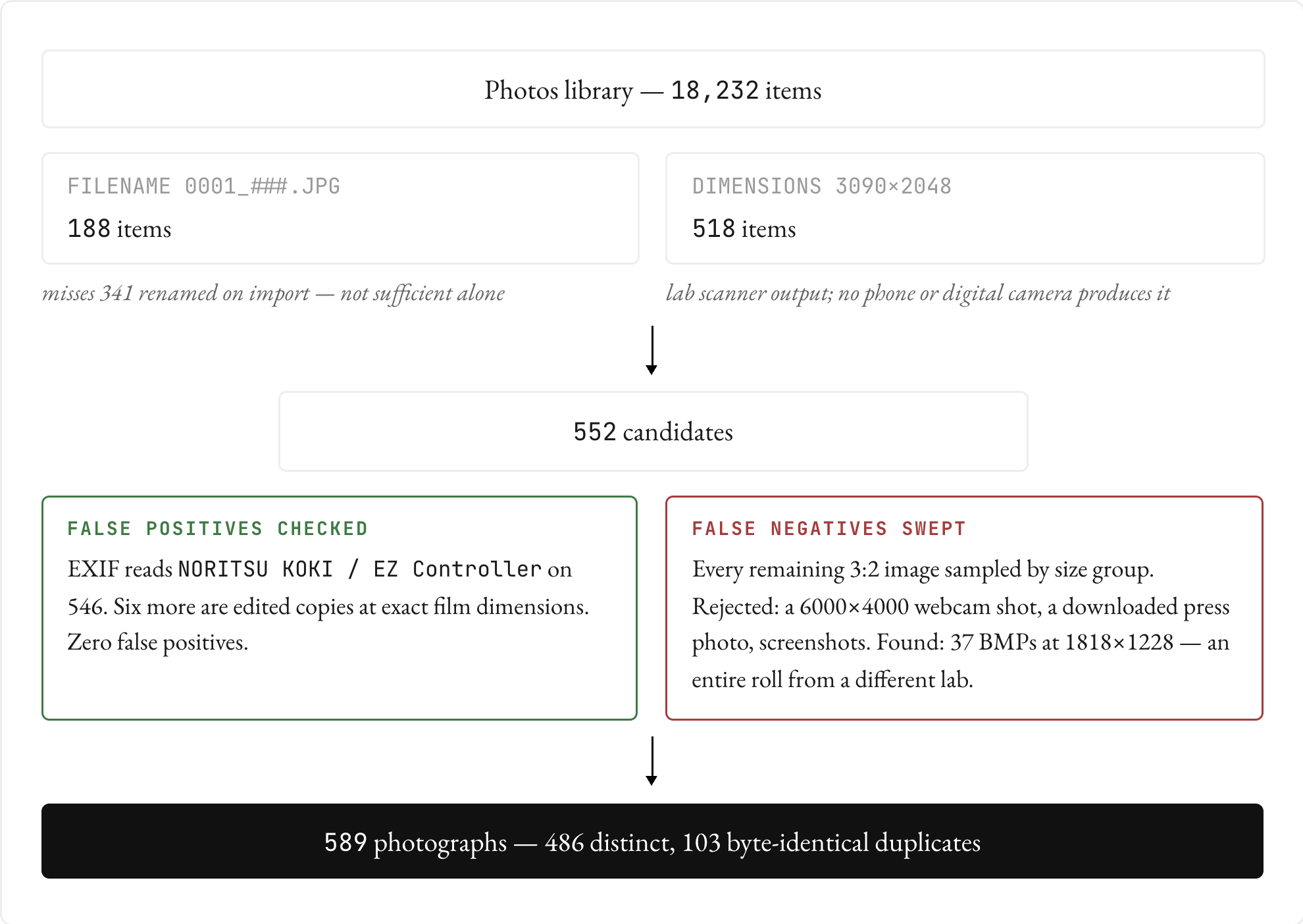 Fig. 1 — Finding 589 film photographs in a library of 18,232
Problem two: ranking the photos
Having found them, I still did not know which were good. 486 photographs is too many to hold in your head and compare fairly, and I am not a neutral judge of my own snapshots.
So I split them into eight batches of about 61 and ran eight independent reviewers over them in parallel, each scoring the same brief: a real moment over a posed one, a clear subject, light doing something, and imperfection that adds atmosphere rather than reading as a mistake. Each nominated its six strongest with reasons. That produced 48 finalists in about three minutes of wall-clock time, which I then looked at myself.
Five of the 48 turned out to be the same photograph nominated twice from different batches — the byte-level dedup had not caught them because they were re-encoded copies, not identical files. So 43 real candidates, from which I picked 20, balancing quality against variety so the set was not nine versions of the same afternoon.
The honest limitation: this is delegated taste. The reviewers apply criteria I wrote, and criteria are not the same thing as judgment. What the fan-out is genuinely good at is the first cut — reading 486 photographs attentively and throwing away the 90% that are documentation rather than photographs. The last cut was mine, and it should be. I took the 20 to 29 afterwards and they are the ones on the film page.
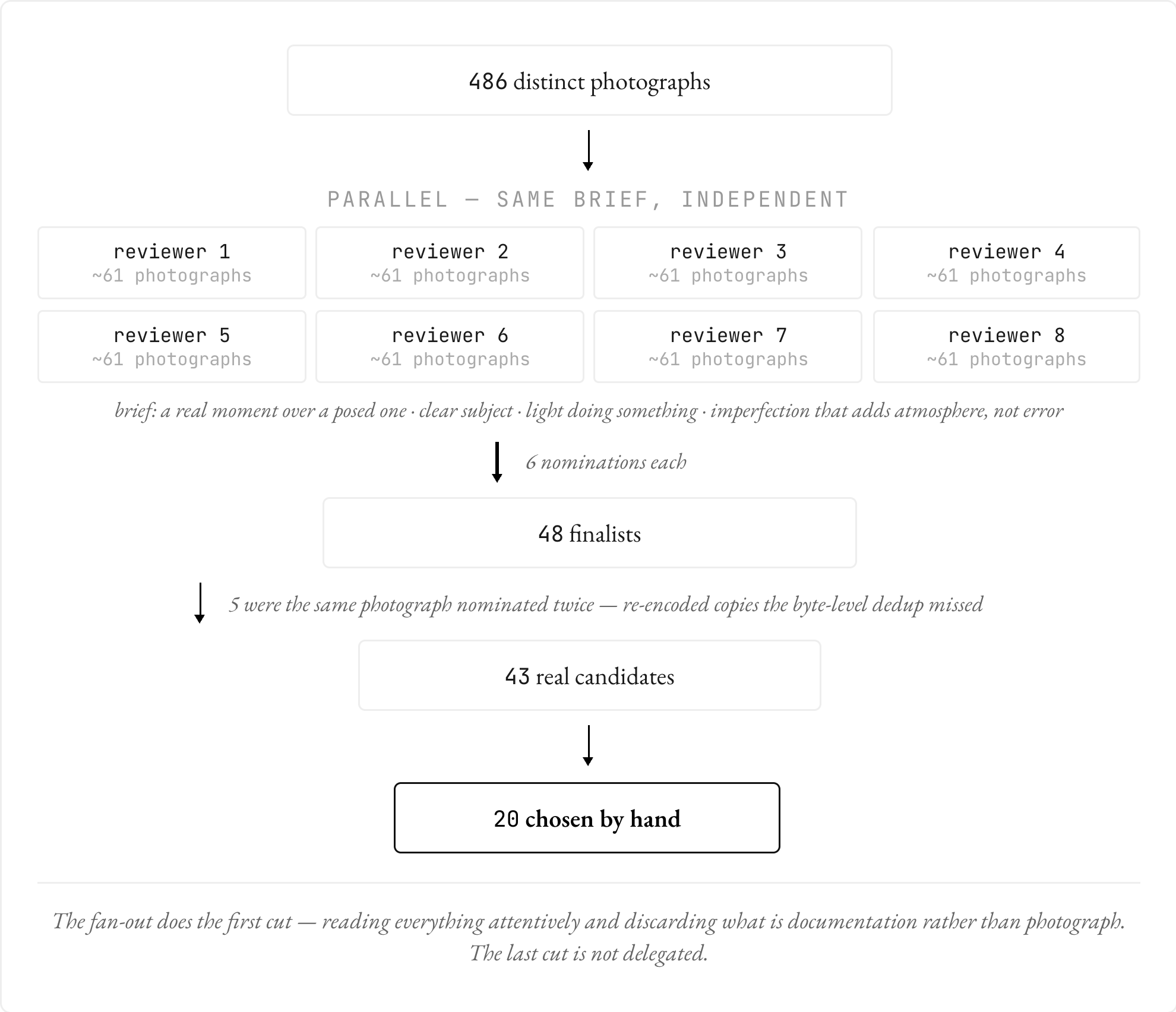 Fig. 2 — Ranking 486 photographs